
Coming soon to Windows
Add music to a video, lowered when someone talks
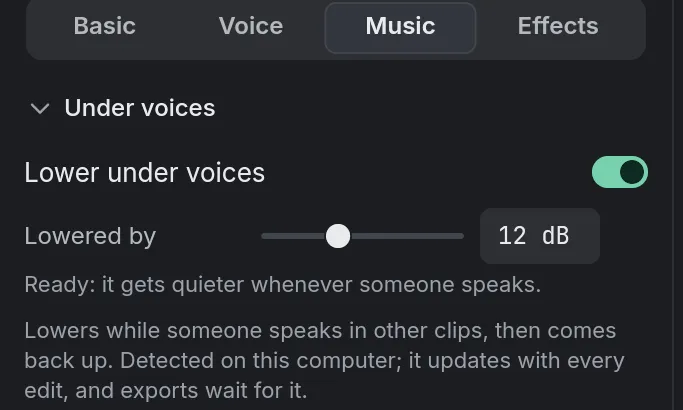
A song under your video that steps back by itself wherever someone speaks and comes back up after, at the volume and with the fades you choose.
Free + ProAdding, trimming and fading music is free; lowering it under voices, and setting the whole export’s loudness, need Pro to export. See pricing
- Lowered under voicesthe music starts going down before the first word, so no word is under it
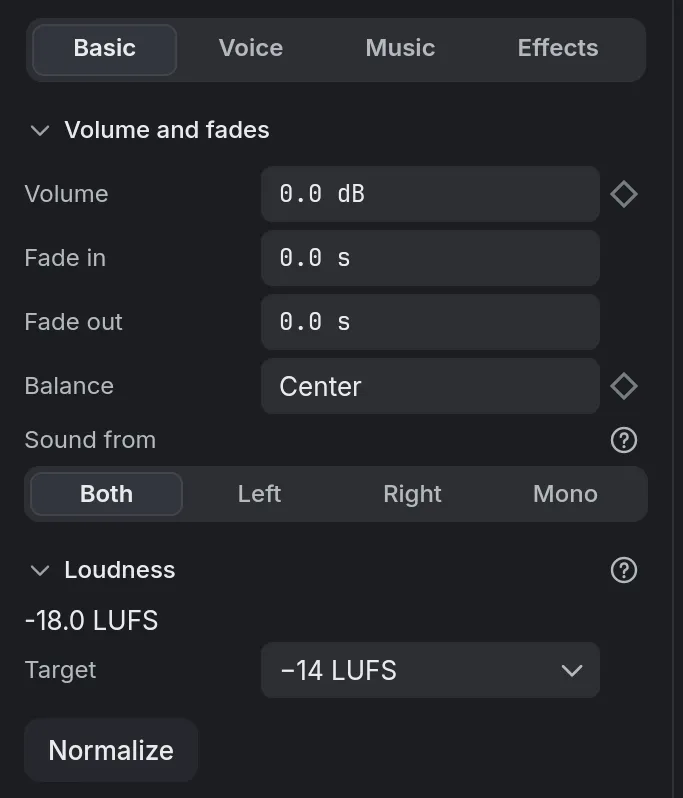
- Normalize loudnessa clip set to −14 LUFS, where online platforms play; the whole export, with Pro
How to do it in Eigami
Drag the song from the library’s Media tab onto an audio track of the timeline.
Select it, then in the inspector’s Audio tab, open Music and switch on Lower under voices.
Set Lowered by for how far it goes down; its waveform drops wherever someone speaks.
In Basic, set its Volume, Fade in and Fade out.
How it works
Who speaks is found
The other clips heard on the timeline count as voices. Eigami tells speech from music by itself, so there is nothing to tag.
No pumping in the pauses
Short pauses between sentences keep the music down, and after the last word it comes back up gently.
As loud as platforms play
Normalize loudness brings the selected clips to a loudness target, and the export can level the whole mix. Meters show the loudness as it plays.
What it needs
- Nothing to download.
- For lowering music under voices, a processor with AVX2, as most made since 2013 have.
- Your own music, as MP3, WAV, M4A, AAC, FLAC, OGG, OPUS, AIF, AIFF, or the sound of a video.
What it doesn’t do
- It comes with no music: the Sounds tab has sound effects and short jingles. Bring your own songs, with the right to use them.
- It doesn’t separate a voice from the music recorded with it. A song with singing on another clip counts as a voice, unless it is set to go down too.
Questions
Can I keep the music loud in the intro?
Yes. Where no one speaks, it keeps its volume; otherwise split the song after the intro and switch Lower under voices off on that piece.
Do I have to redo it after editing?
No. The music follows the voices as they are now, wherever you move, trim or cut them.
Which music files does it open?
MP3, WAV, M4A, AAC, FLAC, OGG, OPUS, AIF, AIFF; also the sound of the videos it opens.
Coming soon to Windows. Eigami is a free desktop video editor with no watermark. Pro, paid once, adds 4K exports and the tools that do the work for you, with AI on your computer. Free, with Pro paid once, through the Microsoft Store for Windows 10 and 11. The app never asks you to sign in. See what it does
Updated