
Coming soon to Windows
Change your voice in a video
Your voice higher, deeper, robotic, on the telephone or in a big hall, in one click, heard as the video plays and exported exactly the same.
Free
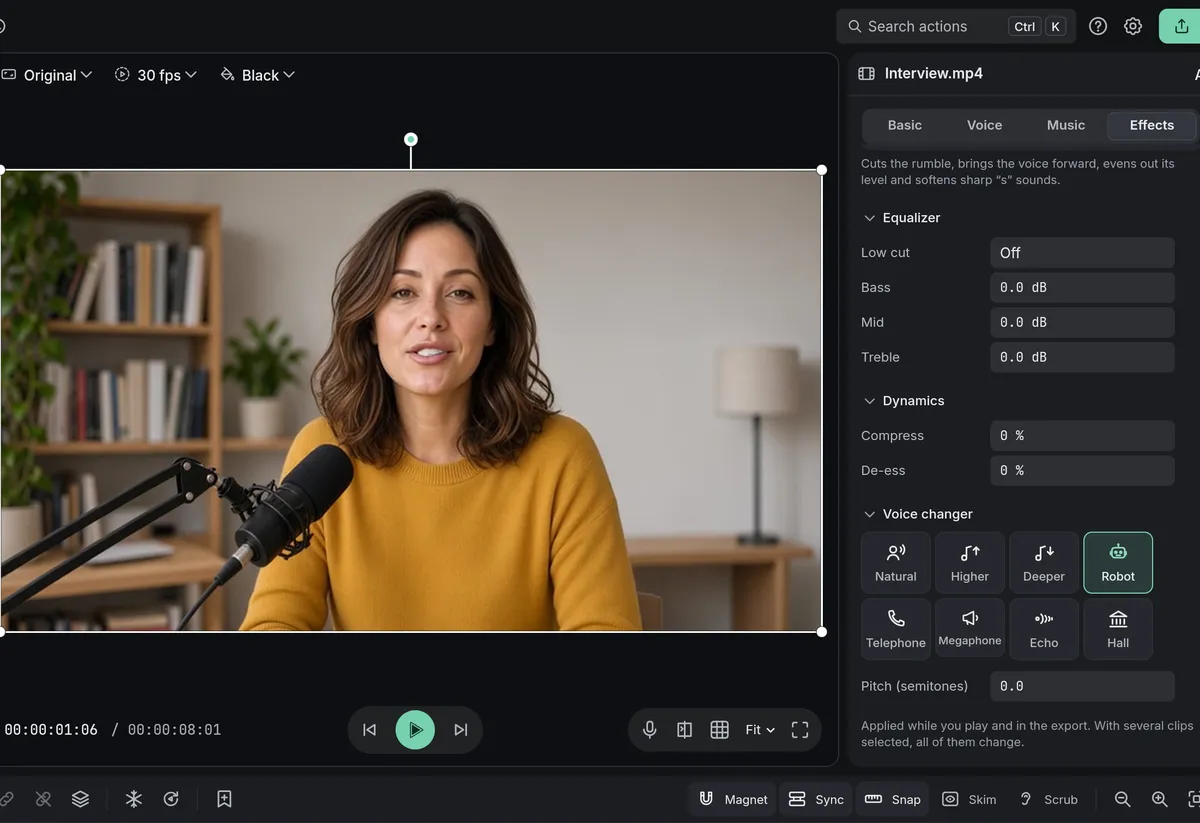
- 7 voicesHigher, Deeper, Robot, Telephone, Megaphone, Echo and Hall, and Natural to go back
- Stays in syncthe pitch changes, the timing doesn’t, at any speed: the voice stays on the lips
How to do it in Eigami
Select the clip with the voice on the timeline.
In the inspector’s Audio tab, open Effects.
Under Voice changer, click a tile, such as Robot or Deeper.
Press Space to hear it.
How it works
One click, one voice
Higher sounds like a cartoon, Robot buzzes, Telephone and Megaphone sound thin and driven, Echo repeats it and Hall adds a big room.
A pitch of your own
Type a value in Pitch (semitones), alone or with a character: a Robot a little deeper, a Telephone a little higher.
Several clips at once
Select several clips to change them all, or copy a clip’s attributes and paste its Audio onto others.
What it needs
- Nothing to download: it comes with the app.
What it doesn’t do
- A clip has one voice from start to end.
- Higher and Deeper move the whole voice up or down, its timing unchanged: it sounds changed on purpose, not like another person.
Questions
Is my voice uploaded?
No. The voice is changed on your computer, and nothing is sent anywhere.
Do captions still understand the words?
Yes. Captions are made from the voice as recorded, not the changed one.
Can I change the voice of a text read aloud?
Yes. A reading from Read aloud is a sound clip like any other: choose a voice for it in Effects.
Coming soon to Windows. Eigami is a free desktop video editor with no watermark. Pro, paid once, adds 4K exports and the tools that do the work for you, with AI on your computer. Free, with Pro paid once, through the Microsoft Store for Windows 10 and 11. The app never asks you to sign in. See what it does
Updated